
What actually happens between deciding to run a programmatic DOOH campaign and seeing your ad on a screen? You write a brief, choose a buying platform and deal type, pick screens and hours, set a budget and pacing, get your creative approved, set up measurement, launch, and then check delivery and adjust; the platform handles the bidding, but every one of those decisions is yours.
This guide walks through those steps in the order you will meet them, with the settings to watch at each stage. For the concepts behind it, such as how pDOOH impressions are calculated, see what pDOOH is and how it differs from online programmatic. For whether programmatic is the right choice at all, see the advantages of programmatic OOH.
Who is involved
| Role | What they do | Examples |
|---|---|---|
| Advertiser or agency | Sets the goal, budget, audience and creative | You |
| Demand-side platform (DSP) | The software you use to choose inventory, set rules and bid | Google Display & Video 360, The Trade Desk, Vistar Media |
| Supply-side platform (SSP) | Makes media owners' screens available to buyers and runs the sale | Broadsign, Place Exchange, VIOOH |
| Media owner | Owns and operates the screens, approves creative | Companies such as JCDecaux and Clear Channel Outdoor |
Some platforms combine roles, and smaller advertisers often use self-service platforms that bundle the buying tools with access to screens. Our programmatic DOOH glossary defines the terms used below.

Step 1: Write a one-page brief
Before opening any platform, write down:
- Objective: awareness, store visits, sales, app installs or something else.
- Audience and moments: who you want and where and when they will be near screens.
- Geography: cities, neighbourhoods or a radius around your stores.
- Flight dates and budget.
- How you will judge success, agreed now, not after the results arrive. Our guide to measuring pDOOH success helps you pick a method.
Step 2: Choose a platform and a deal type
You can buy through a general DSP you already use for online media, a platform that specialises in out-of-home, or a self-service tool. Check that the platform reaches the media owners in your market, and ask about minimum spends and fees. Our guide to where to buy pDOOH inventory compares the main options, and small advertisers can start with our guide to self-service programmatic DOOH.
Then decide how you will buy: open auction, private marketplace or programmatic guaranteed. In many platforms out-of-home is set up differently from online display. In Google Display & Video 360, for example, the help page on buying digital out-of-home explains that you create a "digital out of home" line item and usually work through deals negotiated with the seller and added by deal ID.
Step 3: Pick screens and hours
- Filter by venue type, such as roadside, transit, retail or office, and by location.
- Check each screen's size and orientation, loop length and operating hours.
- Set dayparts so you bid only in the hours that matter.
- Ask what audience data sits behind each screen's impression estimate.
Fewer, well-chosen screens usually beat a long list chosen for reach alone.
Step 4: Set the budget and pacing
Pacing controls how fast the budget is spent. Most platforms let you spread spend evenly or deliver faster at the start. With dayparting, check that your daily budget can actually be spent in the hours you have allowed.
Illustrative example: planning and checking pacing
Illustrative example. All figures are assumptions chosen to show the arithmetic.
- Budget: $8,000 over four weeks, weekdays only (20 days).
- Dayparts: 7:00 to 10:00 and 17:00 to 20:00, so 6 hours a day and 120 hours in total.
- Planned daily spend: $8,000 ÷ 20 = $400. Planned hourly spend: $8,000 ÷ 120 = about $66.67.
- At an assumed $10 CPM, the budget buys $8,000 ÷ $10 × 1,000 = 800,000 impressions, or 40,000 a day.
After the first week (5 days), the plan says $2,000 should be spent. Suppose only $1,400 has gone. Before raising bids, find out why: too few screens selected, dayparts too narrow, a bid below the floor price, or creative still waiting for approval. Once fixed, the remaining $6,600 over 15 days means $440 a day to finish on plan. Our DOOH CPM and budget calculator works out daily budgets and impressions for you.
Step 5: Prepare and approve the creative
- Produce a version for each screen size and orientation on your plan.
- Check which formats each platform accepts. Display & Video 360's DOOH help page, for example, lists static images and standard video as supported, and says HTML5 and dynamic formats are not.
- Allow time for media owner approval, which is usual in out-of-home.
- Design for a few seconds of attention: one message, large type, clear branding.
Our pDOOH creative specs guide covers sizes, durations and file formats in detail.
Step 6: Add conditions, if they help
Many platforms let you bid or change creative based on conditions such as weather, temperature or time of day. A coffee brand might run a hot drink in the morning and a cold one in the afternoon. Each condition needs its own creative and enough budget to deliver when it occurs. Our guide to dynamic creative based on weather and time explains the setup. Check that your platform supports the creative type you plan to use for this.
Step 7: Launch, then check delivery early
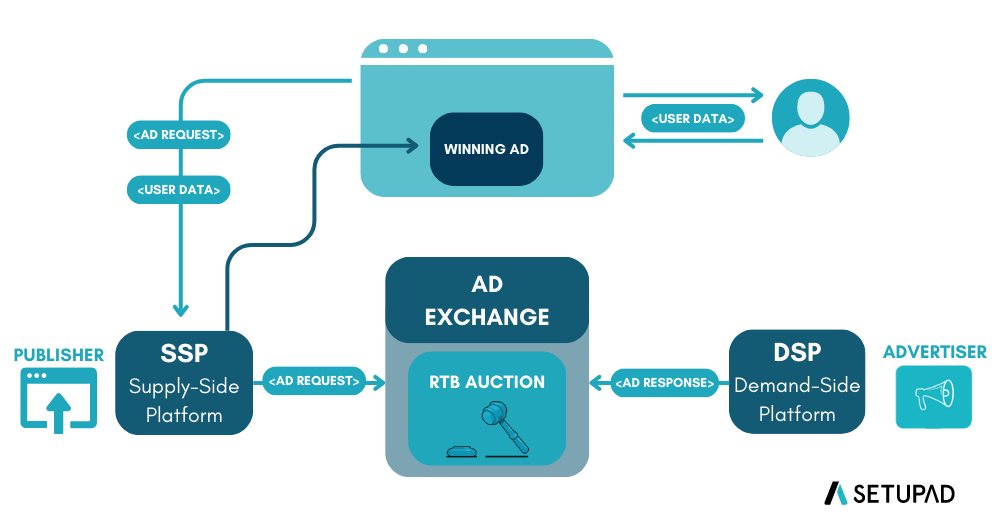
Once live, the platform bids for plays that match your rules. The flow resembles online real-time bidding, shown above: the seller's platform offers an opportunity, buyers' platforms respond, and the winning ad is delivered. Two things differ in out-of-home. The ad may play a short time after the bid is won, because screens run through a loop. And impressions are estimates per play, so reports often show both plays and audience impressions.
Delivery is not always instant. Display & Video 360's help page notes that out-of-home delivery can take about 24 hours to start. Check on day one and day two that spend and plays are flowing, that every creative is approved, and that delivery matches your dayparts.
Step 8: Review weekly and adjust
- Compare spend and impressions with plan, as in the pacing example above.
- Move budget toward screens and hours that perform better on your chosen measure.
- Rotate or refresh creative if response drops.
- Leave your comparison areas untouched if you are measuring lift.
Step 9: Read the final report carefully
Out-of-home reports can include two kinds of impressions. In Display & Video 360, for example, publisher impressions are served impressions multiplied by the seller's estimate of viewers per play, and publisher CPM is calculated from those. Make sure you compare like with like, especially against online channels, and record which audience data source each seller used.
A pre-launch checklist
- Brief written, with a success measure agreed.
- Platform chosen and deal IDs or inventory confirmed.
- Screens, dayparts and geography set.
- Budget and pacing checked against the hours available.
- Creative produced in every size needed and approved.
- Measurement and comparison group set up.
- Someone named to check delivery on days one and two.
Most problems in first campaigns come from a few avoidable slips. Our list of five programmatic DOOH campaign mistakes that quietly waste budget covers the ones to watch for.